|
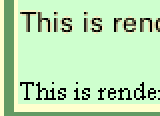
This is rendered with a TrueDoc font This is rendered with the normal Times font |
|
In your HTML, or in your style sheets, you can specify the font you want to use for a particular paragraph, heading, list, etc. Using style sheets you can even specify fallback options if the font isn't available. However, there are two problems with fonts in HTML:
Bitstream's TrueDoc system is aimed at fixing both of these problems. Fonts are downloaded at run-time, so the correct font is always available; and anti-aliasing is used in the rendering of these fonts.
Contents
How To
Results
Security
Problems
Links
Specifying what font to use is normal HTML practise. You can either use the FONT tag in HTML, or (preferably) the font-family attribute in your style sheet. You need an extra line in the head of your HTML document which will load the font when the page is loaded. Something like the following is required:
<LINK REL="FONTDEF" SRC="http://www.truedoc.com/pfrs/Zurich.pfr">
...and that's it. If you're running the right browser, the text will appear in the font you suggest, nicely anti-aliased. If not, you get a boring, ordinary, but still readable font.
Netscape 4 and above has software built in to load and render the embedded fonts. It displays the page first with normal fonts, while it downloads, then redisplays with the embedded fonts. Once they have been downloaded once, they are cached for future use, and other pages that use them display nicely first time.
Internet Explorer doesn't have native support for the TrueDoc fonts (they have their own embedded font technology), but Bitstream say you can use their ActiveX component to display them. I haven't tried this yet.
Here are two lines of text, one using the TrueDoc fonts, and one using the standard fonts:
|
This is rendered with a TrueDoc font This is rendered with the normal Times font |
|
You can see that the normal font is rendered using just black pixels, while the TrueDoc font uses different shades of grey to soften the characters and make them more readable. These fonts can often be used as titles where once the author would have created a GIF using a drawing tool:
One of the problems with images on the net is that anyone can copy an image to their own machine, and then use it themselves, without the owner's permission. The folks at Bitstream decided they wanted to protect the font creators' interests, and so added some security to the TrueDoc mechanism. When you buy a font from someone, you are given a key to use. This goes in the same directory as your web pages that use the font, and though the font is downloaded onto the client computers that access the pages, it can't be used for any other pages without permission.
Happily, Bitstream have supplied a number of fonts which we can use free of charge. Their page contains a list of free fonts which you can use on your own pages.
I have come across a few problems using Netscape with the TrueDoc fonts:
Parent Document: Technical Investigations
Author: David Meiklejohn
Web Page: here
Last Updated: 12/01/1999
Review Date: 01/10/2000